Inside the Adaptive Immersion Platform: On-Device AI That Reads Your Game
Adrian Tamas · · Adaptive Immersion
Screen Sync, Mood Analyzer and Impact Engine turn the audio you already mixed and the frames you already render into lighting and haptics — no SDK call involved. Here is what they do, and how to design for them.
The Adaptive Immersion Platform is a context-aware immersion layer that generates ambient lighting and haptic effects in real time from visual and audio cues your game produces on the player's machine. It is complementary to authored effects, the kind shipped in titles such as 007 First Light, Battlefield 6, Borderlands 4, Silent Hill 2, Marvel Rivals, and provides a responsive baseline for the rest of the game.
It is already live in Razer Chroma for Windows: players can simply select the immersive features from the Chroma dashboard and adjust them per device, app, and game.
For developers, there is another layer of value behind that simplicity. The platform is dynamic: it reads what the game is producing at that moment rather than what someone anticipated at integration time. A new map, a seasonal event, a balance patch that changes how a weapon sounds, or a procedural encounter all get lighting and haptics the day they ship, with no effects work behind them.
Let’s dive in on how all of this works, and how it does impact the developer experience.
Three Features, One Platform
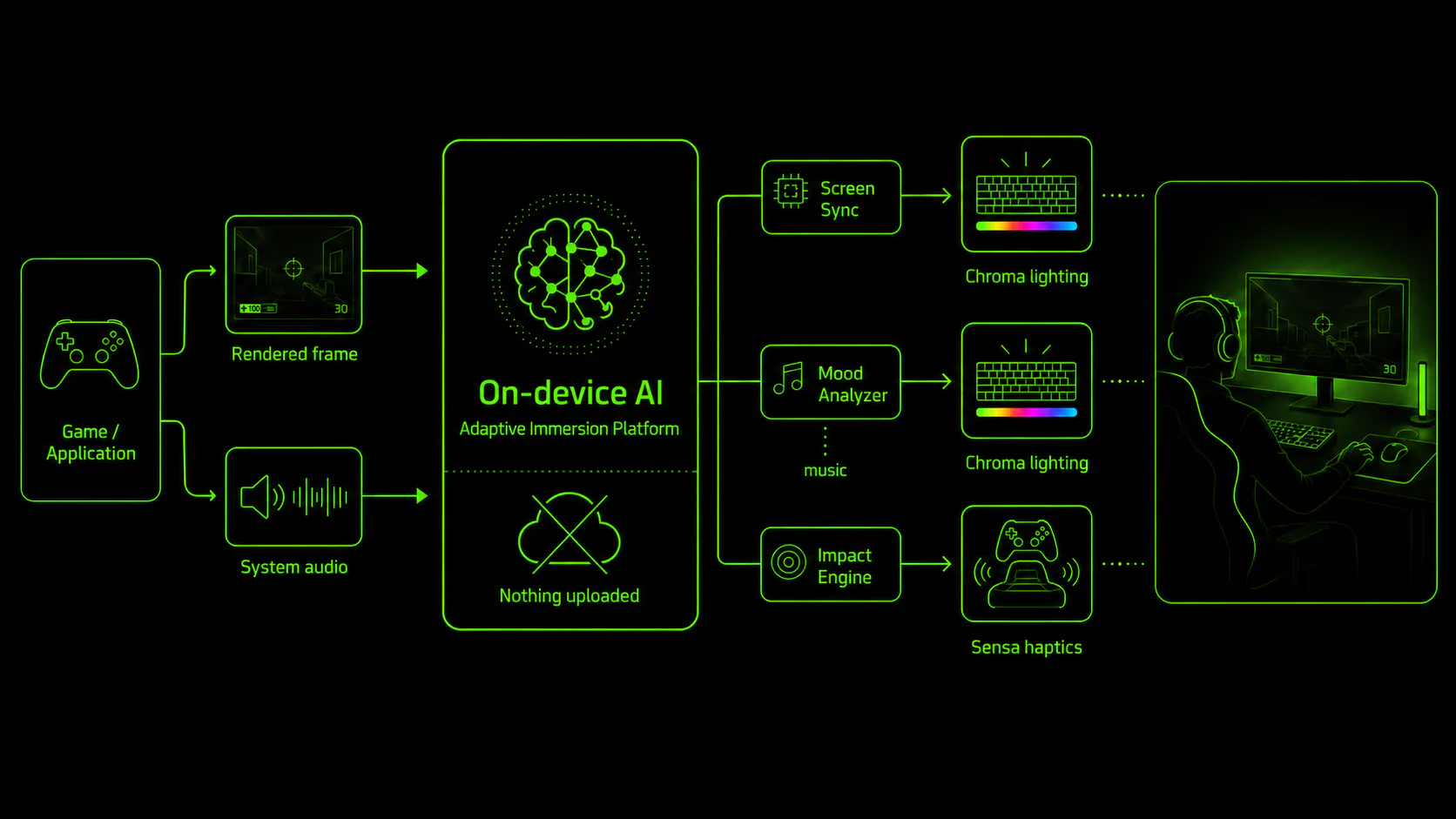
Adaptive Immersion Platform brings together three features, each designed to interpret a different type of gameplay context and translate it into responsive lighting or haptics:
● Screen Sync analyzes the rendered game frame and drives Chroma lighting to reflect the colors and patterns content displayed on screen.
● Mood Analyzer analyzes in-game music and drives Chroma lighting to reflect its mood and emotional character.
● Impact Engine classifies in-game audio events and determines how intense the corresponding Razer Sensa HD Haptics response feels to the player.
● Screen Sync analyzes the rendered game frame and drives Chroma lighting to reflect the colors and patterns content displayed on screen.
● Mood Analyzer analyzes in-game music and drives Chroma lighting to reflect its mood and emotional character.
● Impact Engine classifies in-game audio events and determines how intense the corresponding Razer Sensa HD Haptics response feels to the player.
| Feature | Reads | Drives | Content |
|---|---|---|---|
| Screen Sync | The rendered frame | Chroma lighting | Games and media |
| Mood Analyzer | Musical content | Chroma lighting | Music |
| Impact Engine | Audio events | Sensa HD Haptics intensity | Games and media |
These rendering modes are based on a set of lightweight AI models running on the host device, we optimized their performance and execution logic to run alongside games. More on that later. The analyzed data do not leave the user device, and they are not in the class of language models.
The AI models analyze the media they digest, down sampled screen or audio frame, and run inference for the output they are trained for.
The end user can turn on and off these modes in the Chroma App today. Screen Synch and Mood Analyzer are mutually exclusive as they both control chroma; Impact Engine can run alongside them.
Why It Runs On The Player's Machine
Latency and privacy are the two main reasons why we chose to develop and deploy the models on the player’s PC. Haptics perception in particular is very sensible to multisensory latency, and the only way to ensure the best experience we could provide was to run the inference locally.
Alongside latency, data privacy is fundamental to maintain the trust of the gamers. No data leaves the PC of the user.
We also see in the future the rise of NPUs, which will become ubiquitous on the gamer's device. It was a no-brainer for us to focus where the action happen.
Impact Engine Sits On Top Of Audio-to-Haptics
Impact engine does not directly synthetize haptics.
Doing so would require classifying what’s going on in the content and associate a haptic effect, this approach has latencies in the 100s of milliseconds, which are incompatible with gaming.
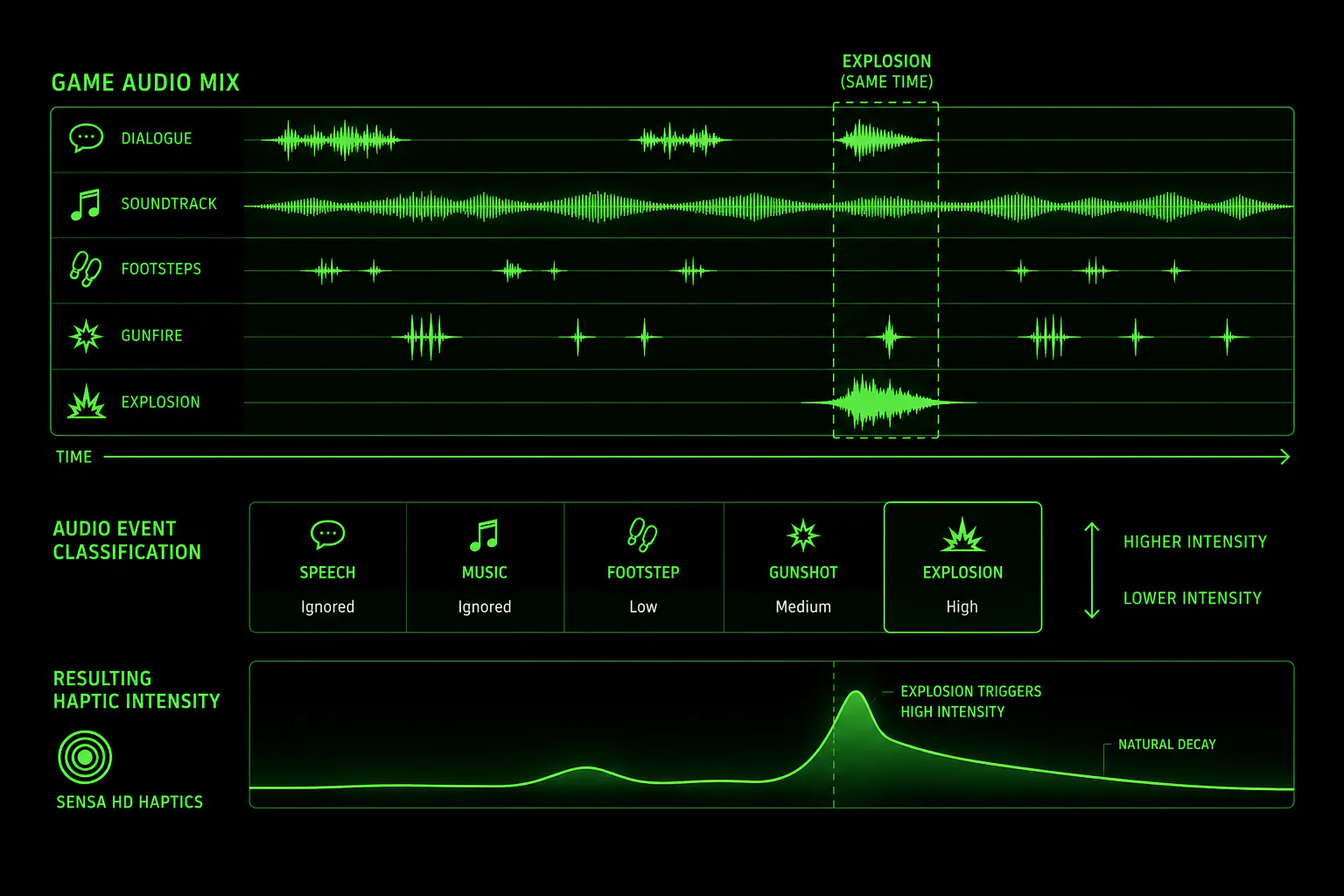
Impact Engine is a small on-device classifier listening to the system audio output continuously and identifies what kind of sound are present in the mix and their relative strength, driving audio haptics conversion based on this classification.
Razer Sensa HD Haptics already converts system audio into vibration, and that conversion is configurable. Synapse exposes four Audio-to-Haptics profiles — Controlled, Balanced, Dynamic and Custom — each with its own gain shaping. The different profiles can be bound to individual games and load automatically when a title takes the foreground.
Impact Engine decides, moment to moment, how much of the conversion should be expressed, based on what the audio actually is.
Here is the pipeline.
| Audio content | Haptic response | |
|---|---|---|
| Percussive, high-energy events such as gunfire, explosions and impacts | Strong | |
| Sustained ambience and environmental sound | Low | |
| Speech | None | |
| Music | None |
When several kinds of sound are present in the same moment, which is what happens in any real mix, the most impactful of them is what the player feels.
The intensity changes are shaped asymmetrically. Impacts rise instantly with no attack ramp. Tails decay gradually to avoid a choppy experience.
We tuned the impact engine to generate the best gaming experience with a wide range of genres, and as a background on which designed haptics effects can shine.
Music is treated the same way, which keeps a soundtrack from driving the haptics all game long. Where music is the point, in a rhythm game or a set-piece built around the score, there are two routes. A curated Audio-to-Haptics profile can apply gain on specific frequency intervals so the track itself carries the haptics, or the WYVRN SDK can author them explicitly.
Next, let's look at Screen Sync, which handles the visual side of the system.
Screen Sync Reads The Frame
Screen Sync watches the foreground window and drives Chroma lighting based on what's on screen. Screen Sync combines several lightweight vision models that read dominant colors, on-screen patterns, and the part of the frame that contains meaningful content. Together, they decide what lighting should be done at any given moment. This ensures compatibility with a wide range of monitor formats, windowed or not, and any image shape modification generated by cinematic scenes.
We applied Razer’s 15 years of experience in Chroma RGB design to develop the best color model possible, complementing the experience.
Mood Analyzer Handles Music
This mode reads the musical score instead of the frame. It listens to the audio, works out its emotional character and drives lighting from that. The mood palette is deliberately fine grained, with distinct readings for characters a coarse model would flatten together, so that an eerie passage and a frightening one do not land on the same lighting.
Speech gets filtered out, so spoken content produces almost no reaction by design. And the result settles over a short window rather than reacting to every bar. Emotional state moves on a scale of seconds, so the lighting moves that way too.
We are quite proud of this one as it is where we started developing all our local inference models and it looks awesome.
The Timing Picture
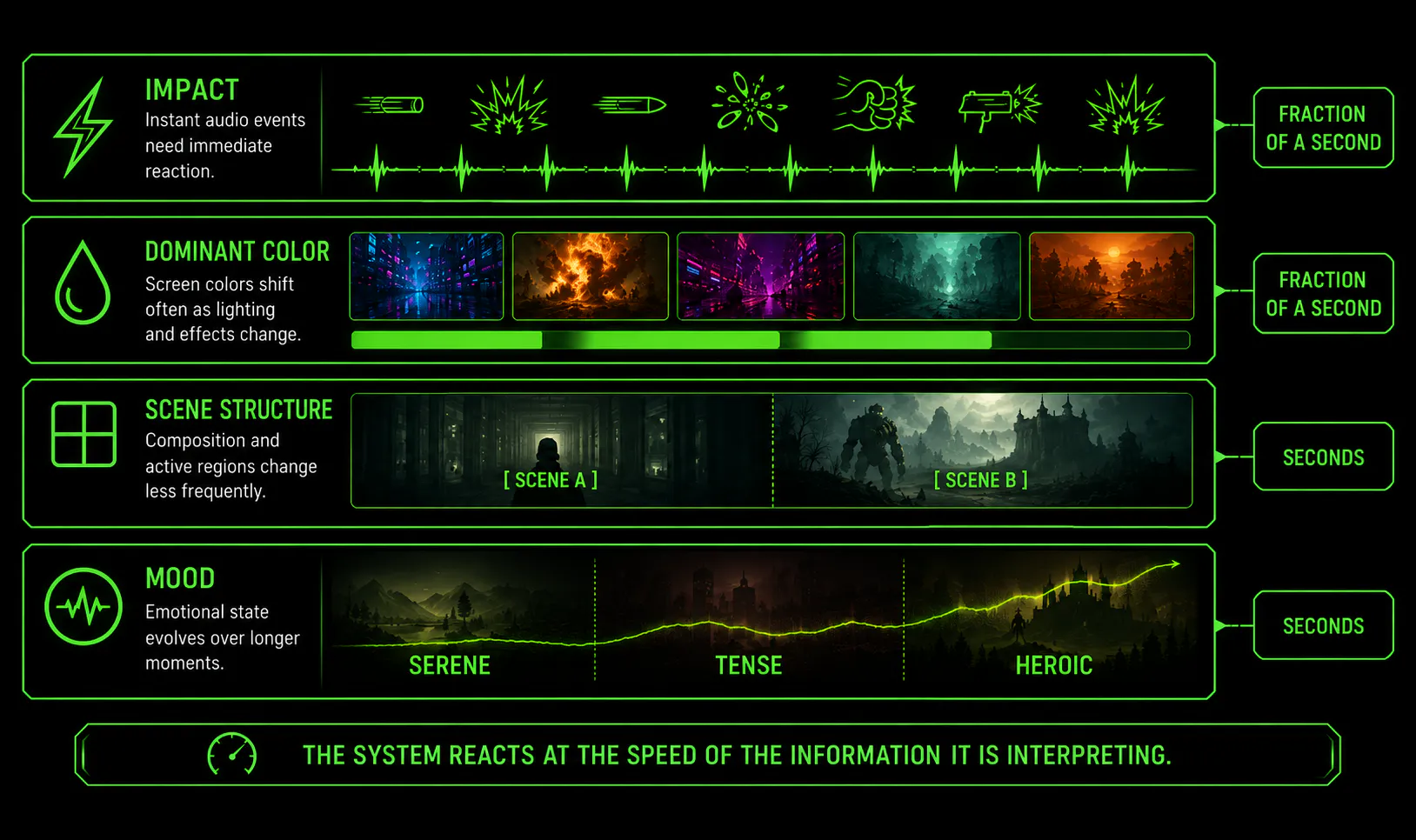
Each feature updates at the rate appropriate to the signal it is interpreting.
| Feature | Analysis | Moves on |
|---|---|---|
| Impact Engine | Audio event response | Fractions of a second, with immediate onset and a smooth decay |
| Screen Sync | Dominant color | Fractions of a second |
| Screen Sync | Pattern and active region | Seconds |
| Mood Analyzer | Mood | Seconds |
That gives the platform a fast channel for impact, a medium-speed channel for color, and slower channels for visual structure and emotional state. Each signal is updated or smoothed at the scale on which that signal actually changes, following the same basic logic as a film mix keeping separate stems for effects, ambience and score.
Those rates explain how quickly the system reacts. For a developer, however, they raise the next practical question: if this analysis is running continuously while the player is in your game, how much of the machine does it use?
What Does It Actually Costs
We measured the system performance on 4 different machines to evaluate performances.
| A | B | C | D | |
|---|---|---|---|---|
| Form factor | Laptop | Desktop | Desktop | Laptop |
| CPU | Intel Core i9-14900HX | Intel Core Ultra 5 250K Plus | Intel Core Ultra 7 270K Plus | AMD Ryzen AI 9 HX 370 |
| Discrete GPU | NVIDIA RTX 4090 Laptop | AMD Radeon RX 9070 XT | AMD Radeon RX 7900 XT | None |
| Integrated GPU | Intel UHD Graphics | Intel Graphics | Intel Graphics | AMD Radeon 890M |
| NPU | None | Intel | Intel | AMD Ryzen |
Between them they cover NVIDIA and AMD discrete cards, Intel and AMD processors, an Intel NPU and an AMD Ryzen AI NPU, and one machine with no NPU at all.
The first useful question is not simply how much compute the models need, but where that compute runs. In particular, a game developer wants to know whether these features compete with the discrete GPU that is already rendering the game.
Where The Work Lands
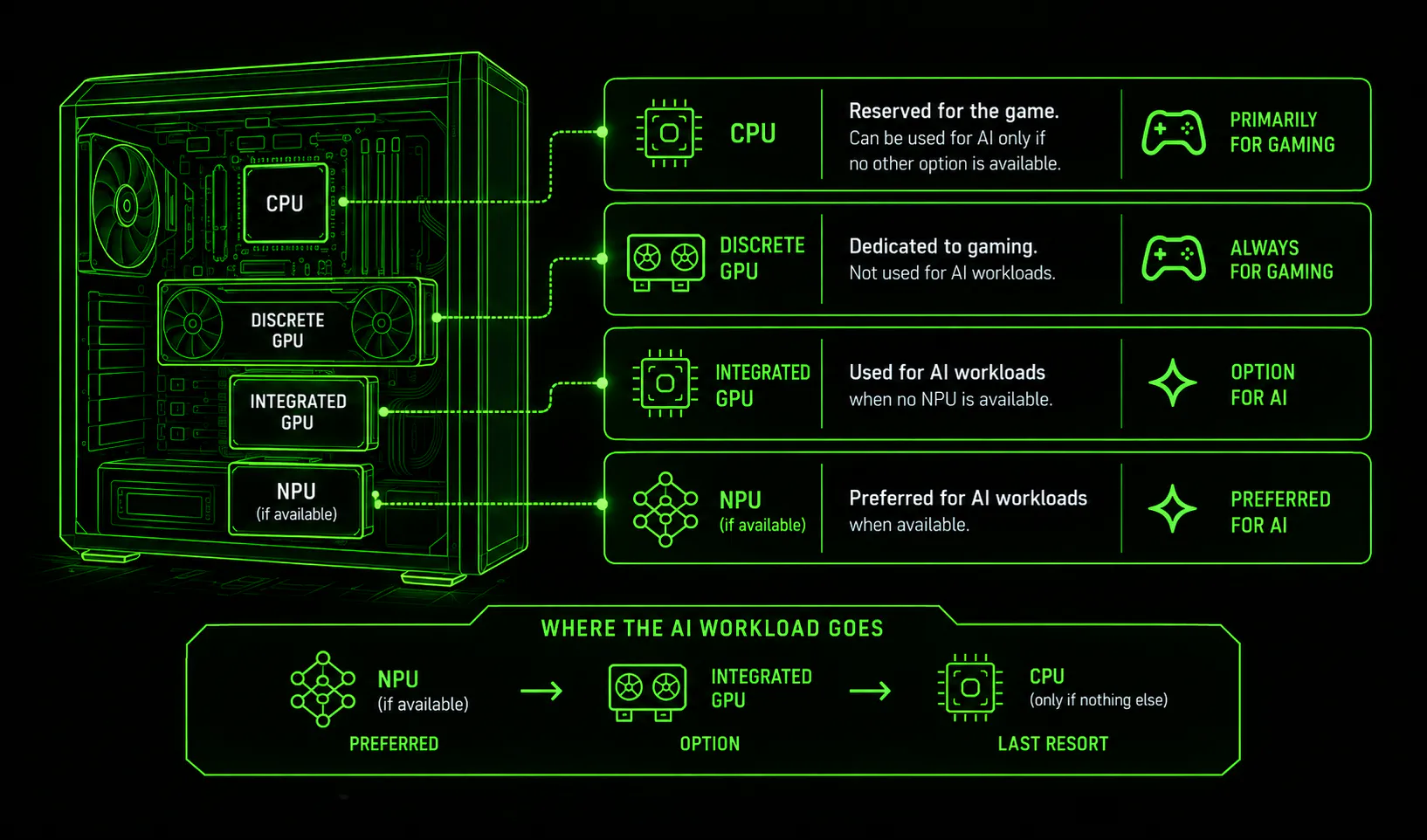
The discrete GPU is not used to run inference, it is dedicated to gaming. If possible we avoid to use the CPU and rely on the integrated graphic card and the NPU to run the inference to leave CPU and discrete GPU free of any process and dedicated to the gaming experience.
Where the work goes instead depends on which silicon is available on the device. The work goes to the NPU where the machine has one, and to the integrated GPU or CPU where it does not.
Who Decides
The models ship as ONNX and run on ONNX Runtime, with the hardware-specific acceleration supplied by Windows ML and integrated with the Execution Providers of the silicon vendors. That is why the placement can differ so completely between two machines with no per-machine configuration.
Two things follow. Acceleration improves without a Razer release, since a better provider arriving through the platform is picked up automatically. And NPU coverage is not tied to one vendor, with Intel and AMD Ryzen AI both covered today.
Windows ML execution providers require Windows 11 24H2. Below that it is handled on the generic hardware without specific silicon acceleration.
What Each Feature Costs
The next question is how much of the selected hardware each feature actually uses in a running session.
The following measurements show steady-state process usage across all execution paths on each of the four machines, sampled every 500 ms. Each cell gives CPU % average, then iGPU % average.
N/A means the path produced no measurement on that machine, either because it is not present or because silicon execution provider was unable to compile the model for the silicon.
The last row of each table is the production selection, which is the configuration a player actually gets.
- A: Intel Core i9-14900HX, RTX 4090 Laptop, Intel UHD Graphics, no NPU.
- B: Intel Core Ultra 5 250K Plus, Radeon RX 9070 XT, Intel Graphics, Intel NPU.
- C: Intel Core Ultra 7 270K Plus, Radeon RX 7900 XT, Intel Graphics, Intel NPU.
- D: AMD Ryzen AI 9 HX 370, Radeon 890M integrated, Ryzen AI NPU, no discrete GPU.
Impact Engine
| Execution path | A (CPU | iGPU avg) | B (CPU | iGPU avg) | C (CPU | iGPU avg) | D (CPU | iGPU avg) |
|---|---|---|---|---|
| CPU | 0.2 | 0.0 | 0.2 | 0.0 | 0.1 | 0.0 | 0.1 | 0.0 |
| CPU OpenVINO | 1.1 | 0.0 | 1.4 | 0.0 | 1.1 | 0.0 | N/A |
| Discrete GPU, DirectML | 0.1 | 1.8 | 0.1 | 0.3 | 0.0 | 0.4 | N/A |
| Discrete GPU, TensorRT RTX | 0.1 | 2.8 | N/A | N/A | N/A |
| Discrete GPU, MIGraphX | N/A | N/A | N/A | N/A |
| Integrated GPU, DirectML | 0.1 | 3.9 | 0.1 | 4.9 | 0.1 | 2.1 | 0.1 | 1.1 |
| Integrated GPU, OpenVINO | 0.2 | 3.1 | 0.3 | 22.7 | 0.1 | 21.8 | N/A |
| Integrated GPU, MIGraphX | N/A | N/A | N/A | N/A |
| NPU, OpenVINO | N/A | N/A | 1.1 | 0.0 | N/A |
| NPU, VitisAI | N/A | N/A | N/A | N/A |
| Production selection | 0.2 | 3.2 | 0.3 | 22.5 | 0.1 | 21.9 | 0.1 | 0.0 |
Screen Sync
| Execution path | A (CPU | iGPU avg) | B (CPU | iGPU avg) | C (CPU | iGPU avg) | D (CPU | iGPU avg) |
|---|---|---|---|---|
| CPU | 1.8 | 0.2 | 2.2 | 0.0 | 1.6 | 0.0 | 3.1 | 0.0 |
| CPU, OpenVINO | 1.6 | 0.1 | 2.2 | 0.0 | 1.3 | 0.0 | N/A |
| Discrete GPU, DirectML | 2.0 | 0.2 | 2.1 | 0.0 | 1.4 | 0.0 | N/A |
| Discrete GPU, TensorRT RTX | 1.7 | 0.2 | N/A | N/A | N/A |
| Discrete GPU, MIGraphX | N/A | 2.0 | 0.1 | 1.5 | 0.0 | N/A |
| Integrated GPU, DirectML | 1.7 | 0.2 | 2.3 | 0.1 | 1.4 | 0.1 | 3.1 | 0.0 |
| Integrated GPU, OpenVINO | 1.8 | 0.2 | 1.9 | 0.7 | 1.7 | 0.7 | N/A |
| Integrated GPU, MIGraphX | N/A | N/A | N/A | 3.2 | 0.0 |
| NPU, OpenVINO | N/A | 1.6 | 0.1 | 1.5 | 0.1 | N/A |
| NPU, VitisAI | N/A | N/A | N/A | 2.9 | 0.1 |
| Production selection | 1.6 | 0.2 | 2.1 | 0.1 | 1.4 | 0.1 | 3.4 | 0.1 |
Mood Analyzer
| Execution path | A (CPU | iGPU avg) | B (CPU | iGPU avg) | C (CPU | iGPU avg) | D (CPU | iGPU avg) |
|---|---|---|---|---|
| CPU | 0.9 | 0.0 | 0.8 | 0.0 | 0.8 | 0.0 | 1.4 | 0.0 |
| CPU, OpenVINO | 1.5 | 0.0 | 1.0 | 0.0 | 1.0 | 0.0 | N/A |
| Discrete GPU, DirectML | 1.2 | 0.5 | 0.7 | 0.1 | 0.7 | 0.1 | N/A |
| Discrete GPU, TensorRT RTX | 1.1 | 1.0 | N/A | N/A | N/A |
| Discrete GPU, MIGraphX | N/A | N/A | N/A | N/A |
| Integrated GPU, DirectML | 1.3 | 1.1 | 0.7 | 1.4 | 0.7 | 0.6 | 1.4 | 0.3 |
| Integrated GPU, OpenVINO | 1.0 | 0.9 | 1.5 | 5.8 | 0.9 | 5.5 | N/A |
| Integrated GPU, MIGraphX | N/A | N/A | N/A | N/A |
| NPU, OpenVINO | N/A | N/A | 1.0 | 0.1 | N/A |
| NPU, VitisAI | N/A | N/A | N/A | N/A |
| Production selection | 0.9 | 0.8 | 2.4 | 5.7 | 2.0 | 6.0 | 1.6 | 0.0 |
During the game session, inference should run on NPU or iGPU, which are unused during gaming sessions without driving significant resources. Even if run on the discrete GPU, it averages the 0.2% of resources. In real world usage, these compute consumptions are not impacting the gaming experience in meaningful ways.
Utilization tells us how much of the machine the features occupy. There is one more performance question to answer: whether each individual inference finishes quickly enough to stay inside the update rates described earlier.
The following measurements show the per-inference cost of each model on its production device, with a warm cache, on machines A to D.
| Feature | A | B | C | D |
|---|---|---|---|---|
| Impact Engine | 10.2 ms | 7.2 ms | 4.8 ms | 4.2 ms |
| Screen Sync | 12.0 ms | 10.0 ms | 9.6 ms | 2.4 ms |
| Mood Analyzer | 13.7 ms | 11.1 ms | 8.2 ms | 5.3 ms |
Every feature completes well within the interval between its analyses, in a few milliseconds on all four machines.
All of these measurements in the tables above come from four configurations, taken in a benchmark host process with no game running alongside. Read them as the shape of the cost rather than as a guarantee for a given title on arbitrary hardware.
How Does It Blend With The WYVRN SDK?
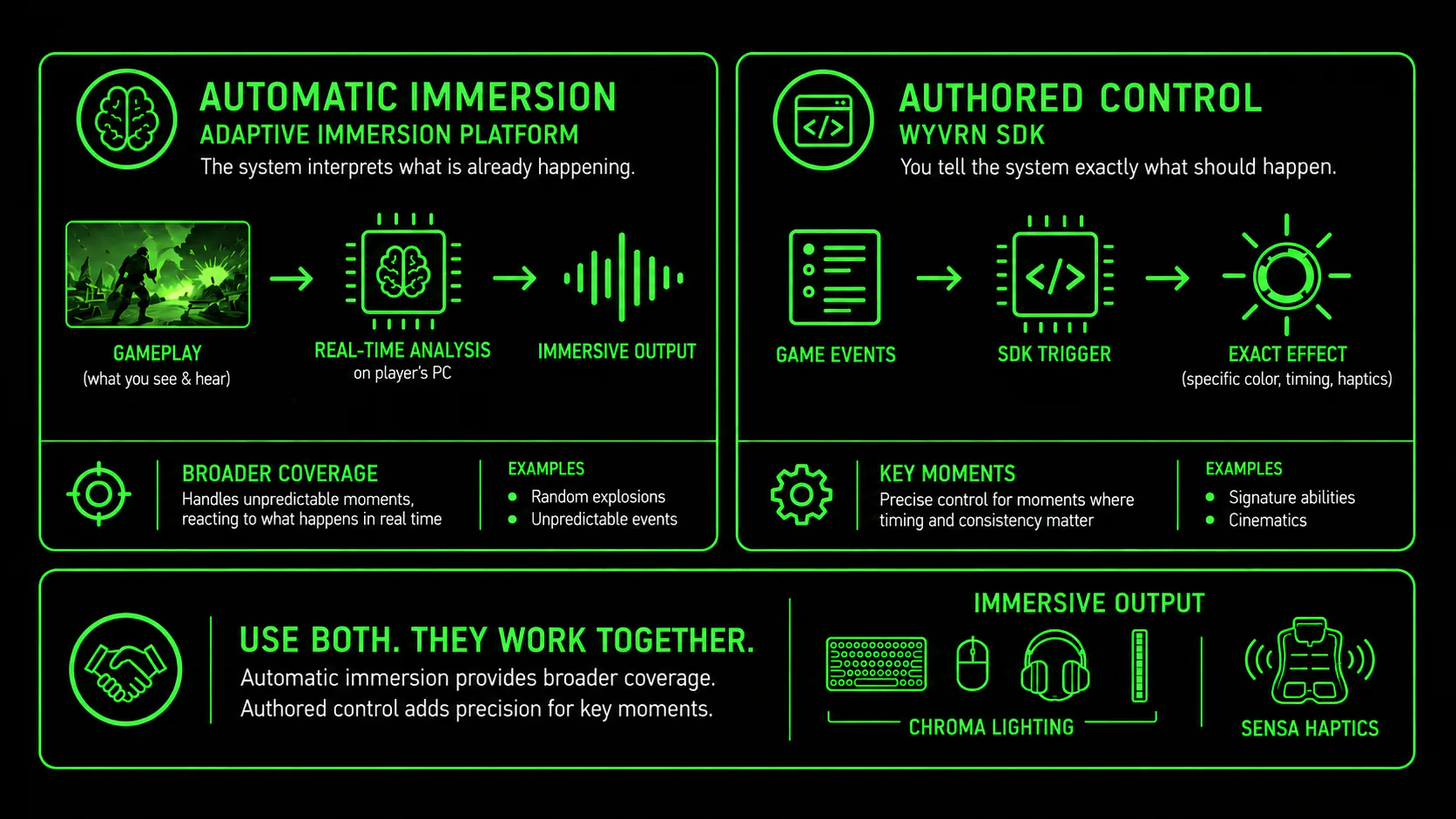
The Adaptive Immersion Platform and explicit SDK integration solve different problems, and titles that want a deeper immersive experience can use both. That is the case we made after GDC in Adaptive Immersive Experience: Context-Aware Haptics in a Multisensory Effects Engine: modern games have grown too complex for purely event-driven effects, and a context-aware layer running alongside authored ones is how immersion scales with them. This section is about where the line between the two falls in practice.
The WYVRN SDK allows developers to name events for game state, player state, abilities, actions, and environments. Those events can then trigger custom-designed Chroma lighting, haptic effects, or both at once. These events happen often and need to be handcrafted to generate the best experience.
Screamer by Milestone, combining designer-authored effects with Screen Sync.
Screen Sync handles the ambient lighting throughout the lap, while boosts and collisions trigger custom effects through the WYVRN SDK.
Screen Sync handles the ambient lighting throughout the lap, while boosts and collisions trigger custom effects through the WYVRN SDK.
For players, combining the adaptive layer with authored effects creates a richer experience: authored effects bring precision to key game moments, while the Adaptive Immersion Platform keeps the rest of the game responsive and immersive.
| Adaptive Immersion Platform | WYVRN SDK | |
|---|---|---|
| Broad coverage at no engineering cost | A specific effect at a specific moment | |
| Emergent or procedural moments you cannot author ahead of time | Scripted moments where you know the timing | |
| Titles that have already shipped | Titles in active development | |
| Approximate, content-derived response is sufficient | Exact control over color, timing or haptic waveform | |
| Music-driven haptics are not required | Music-driven or rhythmic haptics are core to the design |
For developers, the best approach is therefore to let the Adaptive Immersion Platform provide broad ambient coverage and use the WYVRN SDK to author explicit effects for signature moments where exact behavior matters. The two layers are complementary rather than competing.
Today those two layers are wired separately. The platform is a player-side setting in Razer Chroma, and the SDK is the developer's integration; That changes with the next phase of the WYVRN SDK, which brings the inference platform into the developer pipeline. A title will be able to enable and disable the three features from code, scene by scene, and combine them with authored effects at specific moments, so the adaptive layer becomes something you direct rather than something the player switches on. Timing and details will be announced through the WYVRN developer channels.
And taking that route does not mean building every effect from scratch. Razer Indie Lab offers a ready-made library of Chroma and haptic effects you can draw from, which covers a lot of ground, especially for small teams with no dedicated immersion budget. For larger productions, there is also a direct partnership route with Razer, where Razer’s immersive team can design effects for the game.
We are excited to continue pushing the edges of what haptics and RGB lighting can bring to the gaming immersion. More to come, stay tuned.
Today those two layers are wired separately. The platform is a player-side setting in Razer Chroma, and the SDK is the developer's integration; That changes with the next phase of the WYVRN SDK, which brings the inference platform into the developer pipeline. A title will be able to enable and disable the three features from code, scene by scene, and combine them with authored effects at specific moments, so the adaptive layer becomes something you direct rather than something the player switches on. Timing and details will be announced through the WYVRN developer channels.
And taking that route does not mean building every effect from scratch. Razer Indie Lab offers a ready-made library of Chroma and haptic effects you can draw from, which covers a lot of ground, especially for small teams with no dedicated immersion budget. For larger productions, there is also a direct partnership route with Razer, where Razer’s immersive team can design effects for the game.
We are excited to continue pushing the edges of what haptics and RGB lighting can bring to the gaming immersion. More to come, stay tuned.
Building with WYVRN? The SDK, documentation and integration guides are at doc.wyvrn.com. Full behavioral reference for these features lives in the Adaptive Immersion Platform documentation.
Adrian Tamas, Senior Software Engineer